How to Generate 3D Models with AI in 2026: A Practical Guide for Beginners
- Introduction: The Shift That Is Already Happening
- The Structural Shift: From Waiting to Creating
- Leading Tools in 2026: Technical Comparison
- How to Implement: The Modern Workflow
- Real Use Cases: Where It’s Making an Impact Now
- The Economic Side: The Math That Matters
- Real Challenges (No One Mentions)
- Trends Defining 2026
- How to Start Today (For Free)
- Conclusion: The Point of No Return
- Practical Resources 2026
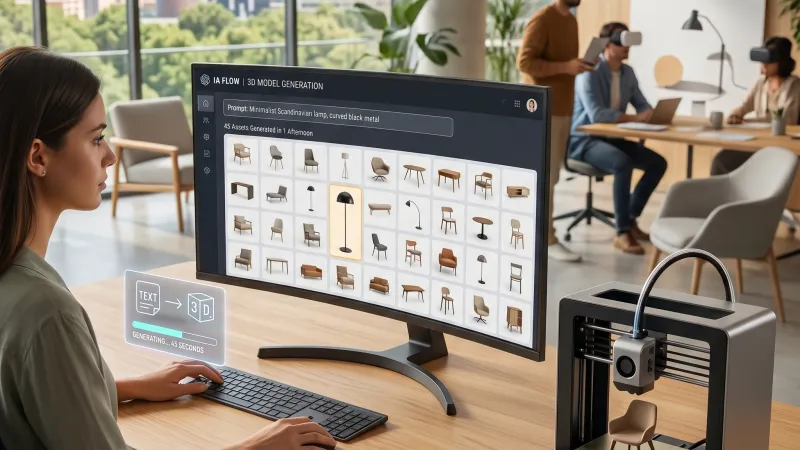
From 3 weeks to 1 afternoon: how 45 3D furniture pieces are generated in the time it used to take to find one model in a library
Introduction: The Shift That Is Already Happening
Three years ago, if you wanted a 3D model of a specific lamp, your workflow involved searching 3D libraries (TurboSquid, CGTrader), waiting for a response from a 3D artist, or modifying it if it didn't fit exactly. This cost between €100-500 per model.
Today in 2026, you type: "minimalist desk lamp, black metal, Nordic style" into Meshy AI, and in 45 seconds, you have a fully textured 3D model, ready to use in your render. This is not a concept; it is operational reality.
A Spanish architect reported three months ago: "With Meshy, I generated 45 pieces of furniture in one afternoon. Without AI, it would have taken me 2-3 weeks commissioning the models or searching for them in 3D libraries. I used several of the models as-is in the final render".
This isn't clickbait. It is what has been happening in architecture studios, film production companies, design agencies, and video game teams since late 2025.
The question is not whether generative AI tools for 3D will change your workflow. It’s how long you wait before adopting them while your competition is already generating 10x more content in 1/10 of the time.
The Structural Shift: From Waiting to Creating
The Silent Crisis of 3D Modeling
Before 2026, there was a clear bottleneck in creative industries. The old pipeline consisted of:
- Designer creates concept (2D)
- Requests 3D model from artist
- Artist models (5-15 hours per asset)
- Adjustments are made (2-5 rounds)
Total timeline: 2-4 weeks per project
The real problem was that specialized 3D artists are expensive (€2,500-5,000/month), they are saturated with demand, and the process is not scalable for small studios. The result: many projects never get made, and limited budgets mean using generic models from libraries. That changed in 2025-2026.
The New Pipeline: Democracy of Creation
The modern pipeline (2026) works as follows:
- Designer writes a description in natural language (2 minutes)
- Meshy/Spline/Kaedim generates a base model (30-90 seconds)
- Designer refines in Blender/Maya if necessary (0-30 minutes)
Total timeline: 15 minutes to 1 hour
The real impact is that one 3D artist can supervise 20 generations in parallel, a designer with no 3D experience can create assets, and the cost per model drops to $5-50 (instead of €500-2,500). It is infinitely scalable.
Leading Tools in 2026: Technical Comparison
Meshy AI (The Generalist)
Best for: Anyone who wants to generate fast 3D models from scratch.
- How it works: Text to textured 3D model in 30-90 seconds, or image to 3D model with production-ready textures.
- Use cases: E-commerce, architectural visualization, indie games, and animation.
- Pros: Unmatched speed, textured models usable directly, and no expertise required.
- Limitations: Complex models require refinement; human characters still have flaws.
- Cost: Free (25 credits/month) to Pro plans at $10/month.
Verdict: The best choice for high volume and speed.
Kaedim (The Premium for Image-to-3D)
Best for: Converting concept art and sketches into production-ready 3D models.
- How it works: You upload an image, the AI generates the 3D model, and a human artist reviews and refines it before delivering professional formats (GLB, OBJ, FBX).
- Use cases: Production companies, architecture studios, and premium e-commerce.
- Pros: Human quality guarantee, professional formats, and more faithful conversion than Meshy.
- Limitations: Slower due to human review and more expensive (from €120/month).
- Cost: From €120/month to €300/month for professionals.
Verdict: Ideal for studios with paying clients where the quality guarantee justifies the higher cost.
Spline AI (The Browser-Based One)
Best for: Creating 3D directly in the browser without installing software.
- How it works: Access via web, describe or upload an image, edit, animate, and share collaboratively directly in the cloud.
- Use cases: Web agencies, interactive marketing, and collaborative presentations.
- Pros: No installation required, cloud rendering, and real-time collaboration.
- Limitations: Less fine control than desktop software and slightly slower generation.
- Cost: Limited free plan, Pro for $12/month, and Team for $50/month.
Verdict: Perfect for web experiences and fast remote collaboration.
Luma AI (The Photogrammetric One)
Best for: Scanning real spaces and converting them into navigable 3D.
- How it works: You capture video with your phone and Luma generates a point cloud, mesh, and navigable 3D scene (NeRF).
- Use cases: Architecture, real estate, museums, and construction documentation.
- Pros: Ultra-fast scanning, photogrammetric precision, and automatic interactive spaces.
- Limitations: Requires real video capture; it is not generative from text.
- Cost: 10 free scans/month or Pro for $9.99/month.
Verdict: Revolutionary for capturing reality, but does not replace modeling assets from scratch.
How to Implement: The Modern Workflow
Step 1: Choose Your Starting Point
- Concept art/sketch: Use Kaedim.
- Text description: Use Meshy or Spline.
- Physical space: Use Luma.
- Web collaboration: Use Spline.
Step 2: Generate the Base Model
In Meshy, simply write the prompt (e.g., "Ergonomic office chair, black leather"), select the "Realistic 3D Model" style, click generate, and wait 45 seconds to get a textured model.
Step 3: Evaluate Quality
If it is correct and ready for production, download and use directly (saving 3-5 hours). If it needs adjustments, proceed to export the model.
Step 4: Desktop Refinement (Optional)
Download the file and open it in Blender or Maya to adjust geometry and polish textures using tools like Topaz Gigapixel or Substance 3D.
Step 5: Integration into Final Project
Import your finished model into SketchUp, Unreal Engine, Unity, or incorporate it into your e-commerce website.
Real Use Cases: Where It’s Making an Impact Now
Case 1: Small Architecture Studio
Before: 200 modeling hours per project (€8,000-10,000 cost) and 4-6 weeks timeline.
Now (2026): 40 total hours integrating IA (€1,500-2,000 cost) completed in 5 days. They can accept triple the projects.
Case 2: E-commerce Furniture Store
Before: €500-1,000 for each manually commissioned 3D model.
Now (2026): They generate models from their stock photos using Kaedim or Meshy for €20-50 per unit. 10-20x cost reduction with increased sales conversion.
Case 3: Audiovisual Production Company
Before: 40-60 hours to model an asset from conceptual art plus 10-20 extra hours for revisions.
Now (2026): Kaedim generates the model in 2 hours and it is refined in 10 hours. 60% time saved.
Case 4: Freelance Designer (No 3D Experience)
Before: Lost lucrative projects for not being able to offer 3D renders or lost margin outsourcing.
Now (2026): Generates with Meshy, offers full renders, and increases annual income by €20,000-50,000 by accessing new markets.
The Economic Side: The Math That Matters
2026 Cost Analysis
- Old method: Average of €800-1,600 per 3D model (including artist fees and revisions).
- New method (AI): AI subscription ($10/month) + marginal refinement cost. Total per model: €30-50.
- Result: 95-97% net reduction in the cost of 3D asset production.
Real Challenges (No One Mentions)
1. Inconsistent Quality
AI doesn't always generate perfection. Vague prompts will waste your credits. The solution is to iterate and use highly detailed descriptions.
2. Copyright and Ownership
In 2026, most tools (Meshy, Kaedim, Spline) grant you ownership of what is generated. However, for high-risk commercial projects, Kaedim is recommended for its human review.
3. Human Characters are Still Weak
Proportions and facial expressions in automatic generation can fail. For avatars and humans, use specialized solutions or refine extensively in ZBrush.
4. Technological Dependency
Strategically, you should not rely on a single provider. Learn Blender or Stable Diffusion to ensure your operational flow in case a platform closes or changes its policies.
Trends Defining 2026
1. Faster and Faster Generation
We've gone from minutes in 2025 to 10-30 seconds in 2026. The expectation for 2027 is real-time generation as you type.
2. From Text to Behavior
Soon, models will be generated already rigged, with physically realistic textures and base animations (walking, posing) directly from the prompt.
3. Integration into Professional Software
Traditional modeling tools like Blender, Maya, and Substance 3D are already integrating or preparing to include native AI generation.
How to Start Today (For Free)
Free Plan (Day One)
Access Meshy.ai, create a free account, and generate three basic models to familiarize yourself. Download and view them on your PC. Time spent: 30 minutes. Cost: €0.
Beginner Plan (Month One)
Invest $10 in Meshy Pro, generate models for a real project you have active, evaluate the need for refinement, and deliver the result to a client.
Professional Plan (Scaling)
Combine Meshy Pro, Kaedim (for premium), Blender, and texture upscaling tools. Improve your flow by taking specific training and transform your operational margin.
Conclusion: The Point of No Return
We are at a moment analogous to 2010 with digital photography. In 1995, a professional photographer might say: "Digital photography will never reach the quality of analog". Today we know they were wrong.
In 2026, a junior 3D modeler who doesn't learn to use AI for asset generation is choosing to stay behind. AI 3D generation tools are not "nice novelties"; they are competitive infrastructure.
The question you must ask yourself is not: "Should I learn to generate 3D with AI?" It is: "How long can I afford to wait while my competition is already doing it?"
The tools are ready. Prices are accessible. The ROI is verifiable. All that’s missing is for you to open Meshy.ai and write your first prompt.
Practical Resources 2026
- Meshy: www.meshy.ai ($10/month)
- Kaedim: www.kaedim3d.com (€120/month)
- Spline: www.spline.design (Free - Pro $12/month)
- Luma AI: www.lumalabs.ai (Free - Pro $9.99/month)
- Software: Blender, Topaz Gigapixel, Adobe Firefly.